PSCO Case Study

Overview

PSCO is a 10-week project for my course Design + Content: Introduction to UX Content Strategy. This is an app and a website designed for freelance photographers or part-time photographers and customers who are looking for photographers. Applying UX design and content strategy knowledge, I went through phases of user journeys and user research, content hierarchies, wireframing, principles of IA, prototyping, usability test, and iteration. By providing a e-commerce market platform for both photographers and customers, the product can provide more convenient and simpler experience for both parties. Because of the time limit, the project focused on people who are searching for photographers.

Responsibility

This was an individual project. I took responsibility in every step of the design process.

My role: UX designer, UX researcher, content strategist, web designer

Tools

User Observation, Informative Interview, User Journey, Personas, Wireframes, Interaction Flow, Paper Prototype, User Testing, UI Design

Lucidchart, Balsamiq Mockup 3, Sketch, Photoshop.

Background

A lot of my friends are freelance photographers and part-time photographers. I always see them struggling with looking for clients. At the same time, customers are exhausted to find photographers they like with reasonable prices. For example,  one of my friends spent more than 1 month to find a wedding photographer. She sent me a dozen of URLs of wedding photography studios and asked me for my opinion. I had to check different websites and compare these photographers. I figured that there is a communication barrier between photographers and customers.


The Challenge

●  It is difficult for talented freelance photographer to find clients and schedule photo shoots with clients. For example, the photographers have no platform to market; there are limited things they can do if the clients do not show up; or it is not efficient or convenient to communicate with clients by emails or IMs.

●  It is very inconvenient for people find photographers they are satisfied with easily. Existing ways like Google search, Facebook, Instagram, or friends referral are inefficient and lack transparency and quality guarantee. 

User Observation

Summary

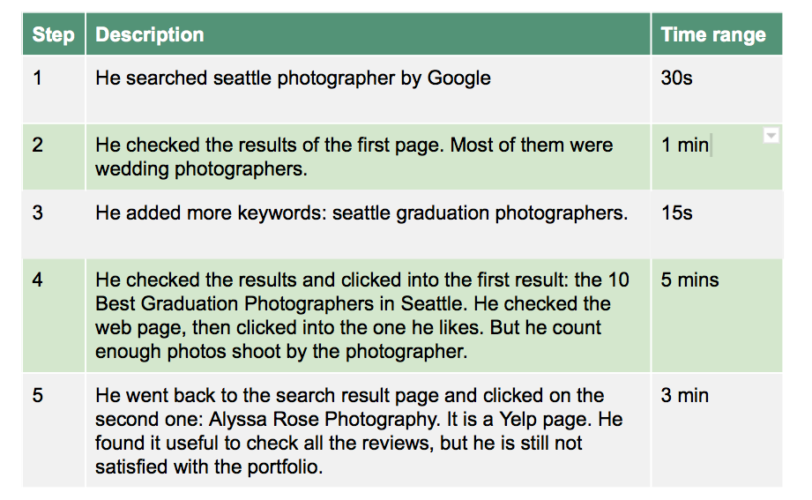
The observation was conducted in Mercer Court on 9th December 2016. The observation is about how the individual observed search for photographers online. The goal of the individual is to find a photographer for his graduate ceremony.

Observation 


Analysis

I think the observed individual is not satisfied results. Not matter Yelp or Thumbtack can not provide information he wanted for photographers.

Improvements
● Provide more information for Google to research, like the type of events, style of photographers, etc

● Provide more photos; 

● Tag photos with more accurate descriptions;

● Provide customers’ reviews.

Informative Interview

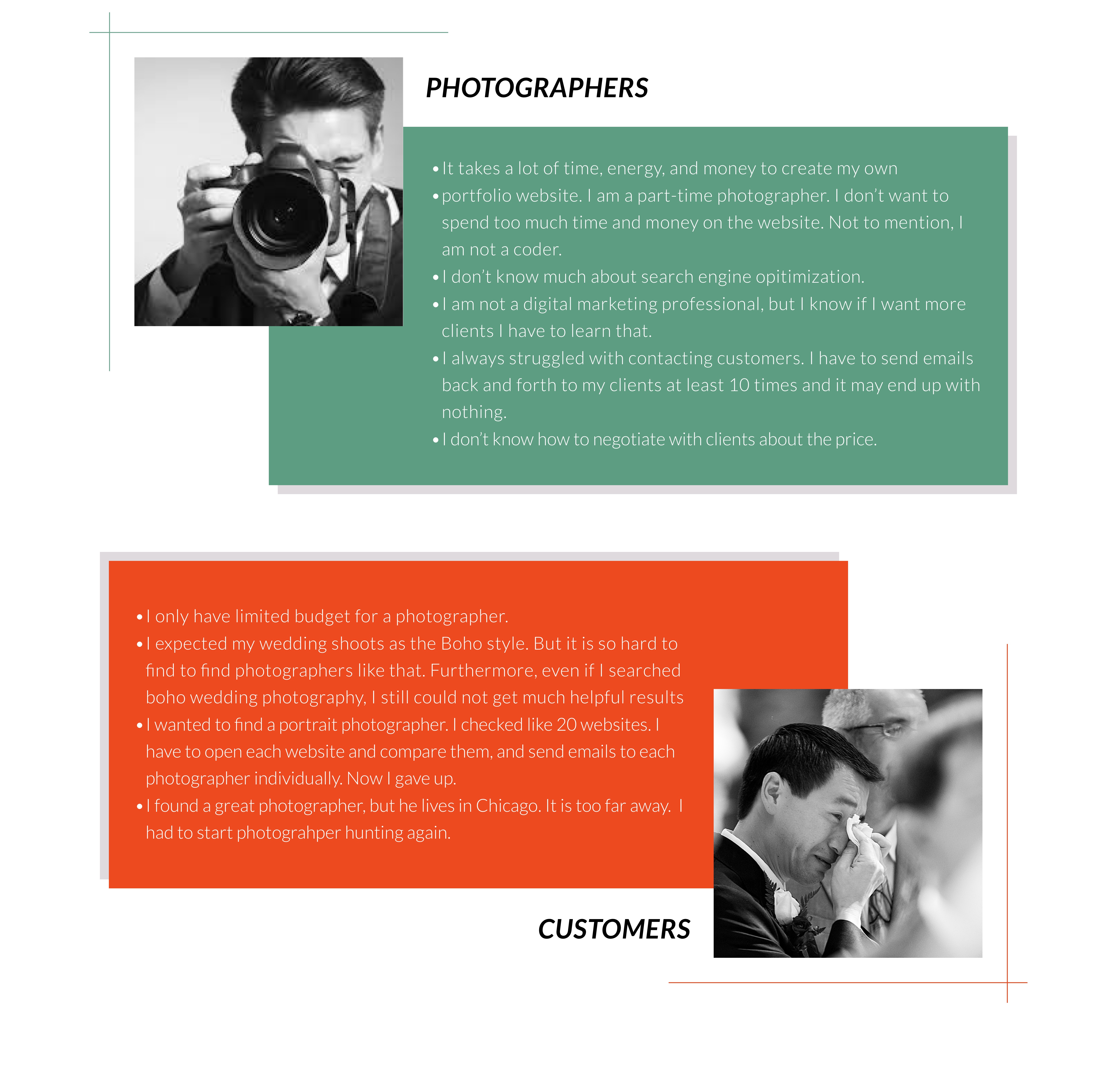
I conducted a number of interviews on photographers and potential customers in order to know more about all the difficulties they encountered when they were looking for clients or looking for customers..


Personas

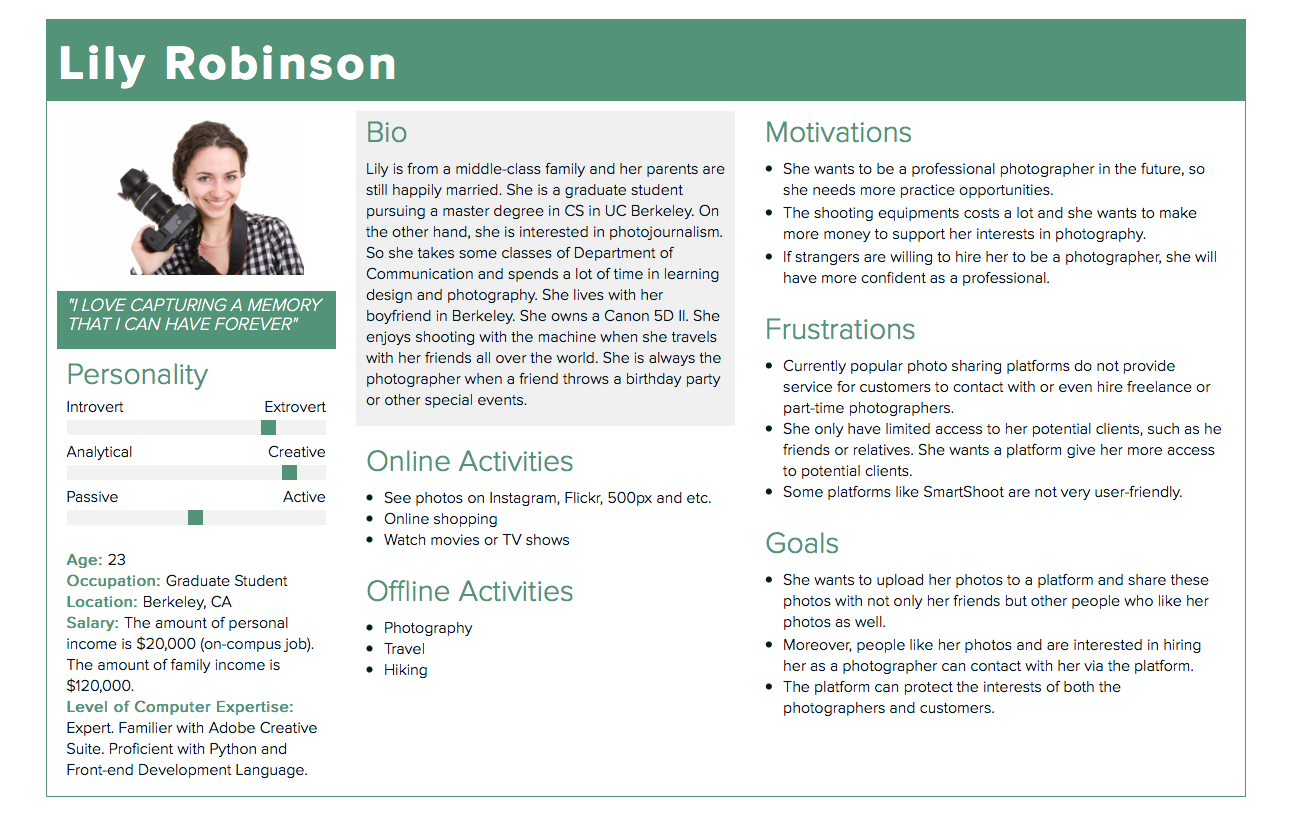
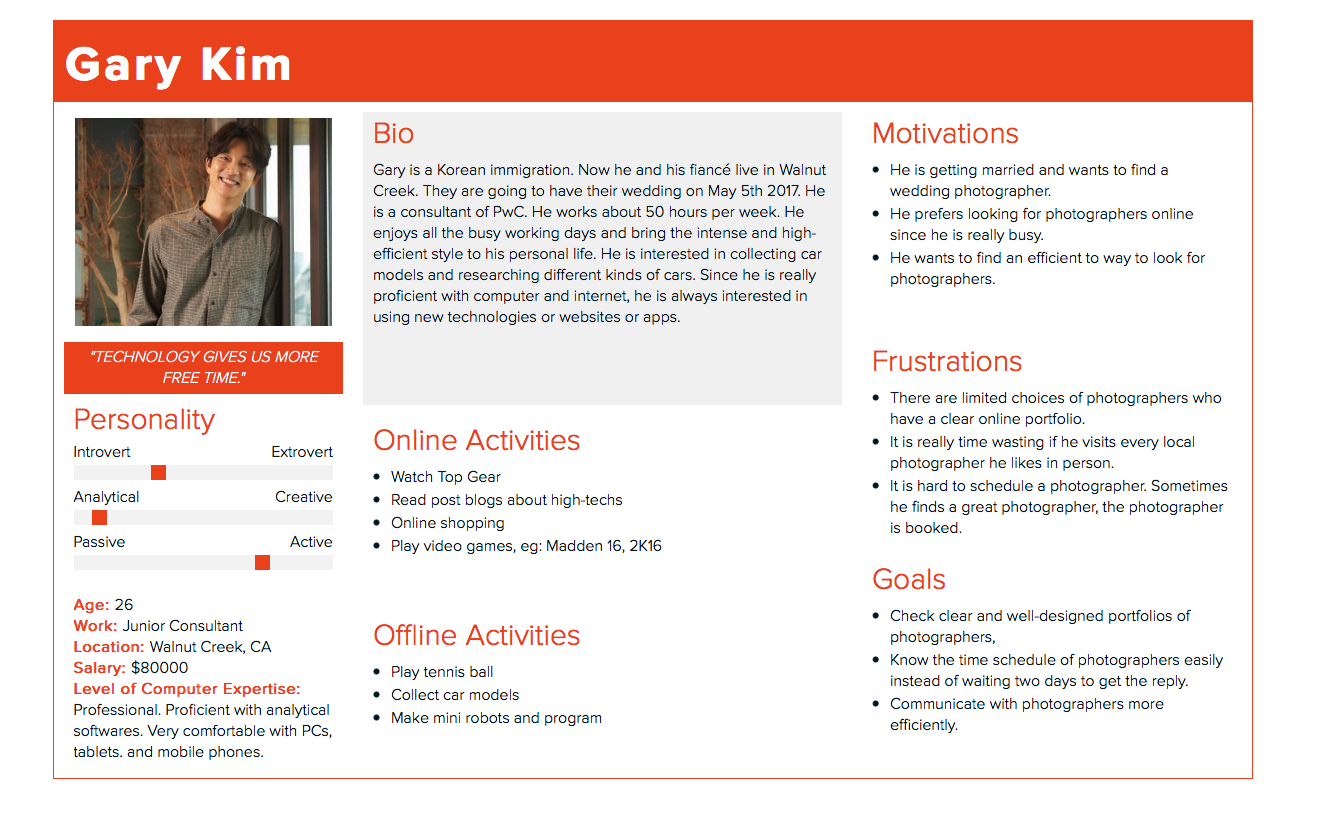
Based on user observation and informative interview, I created two personas to paint a portrait of typical users.

Competitive

Analysis

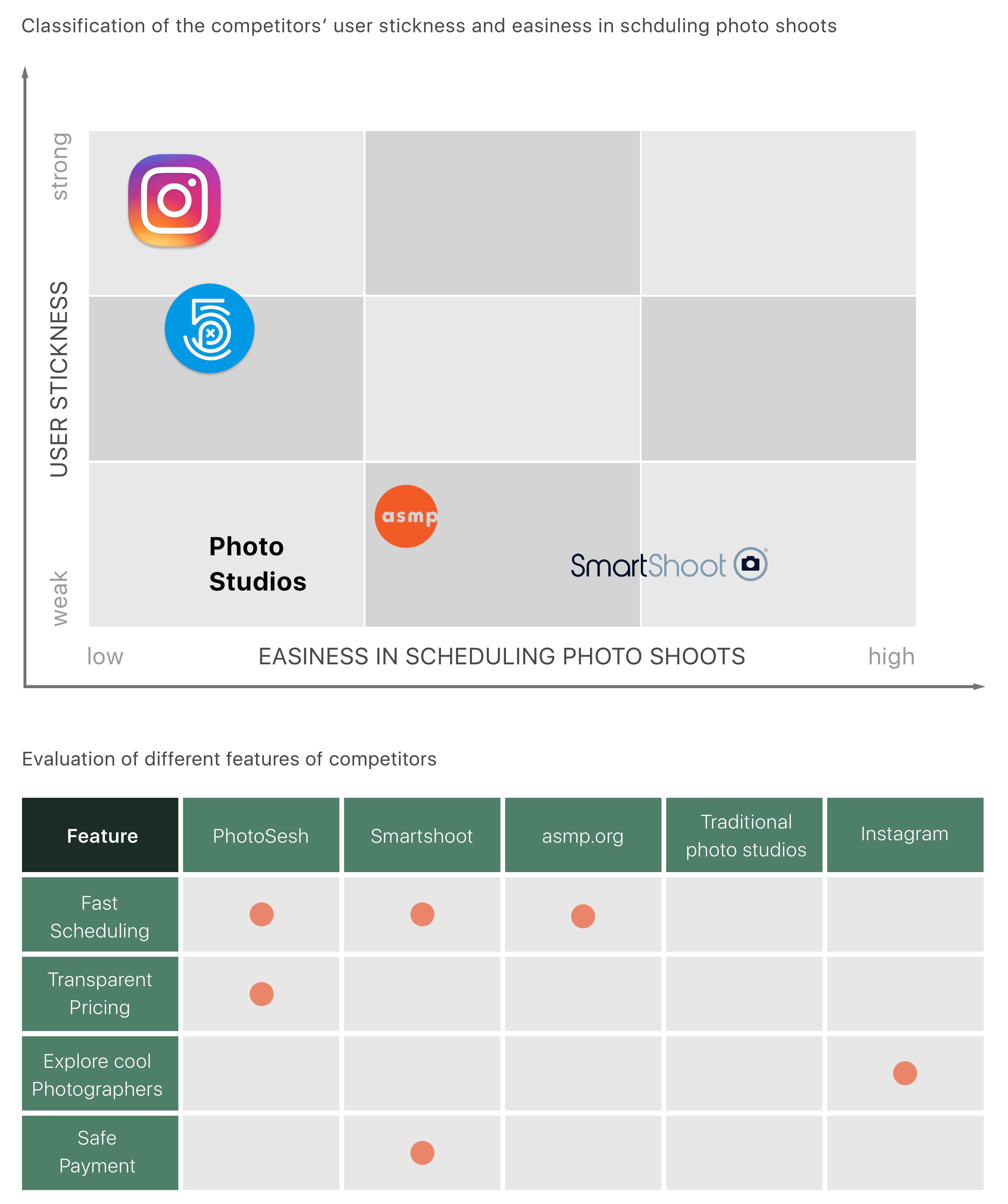
I studies a number of  PSCO’s competitors, including smartshoot.com, asmg.org, traditional photo studios, etc. My primary finding is that most of the competitors’ websites are hard to navigate and failed to provide a simple and user-friendly interface to both photographers and customers. For customers, those competitors only fit part of users’ needs like exploring photographers, fast scheduling, they failed to save customers time and deliver a personalized and convinient booking experience to them. For photographers, most of those competitors did not provide an open marketplace for freelance photographers. Even if it does, it failed to provide a transparent pricing system.


Solutions

Based on the user research, I identified the problem and brainstormed solutions to the problem.  My final solution is to create a marketplace to allow people to find the right photographer and give photographers a platform to showcase their talent while make some money. 

Features include:

● Customers can view, compare and find their favorite photographers before they make up their mind.

● Transparent pricing: based on customers reviews and rating customers, we’ll put a market price next to the photographer’s rate so that both consumers and photographers can get a fair price.

● Easy and trustworthy space to schedule photo shoots and make payment.


PSCO Case Study

User Flows

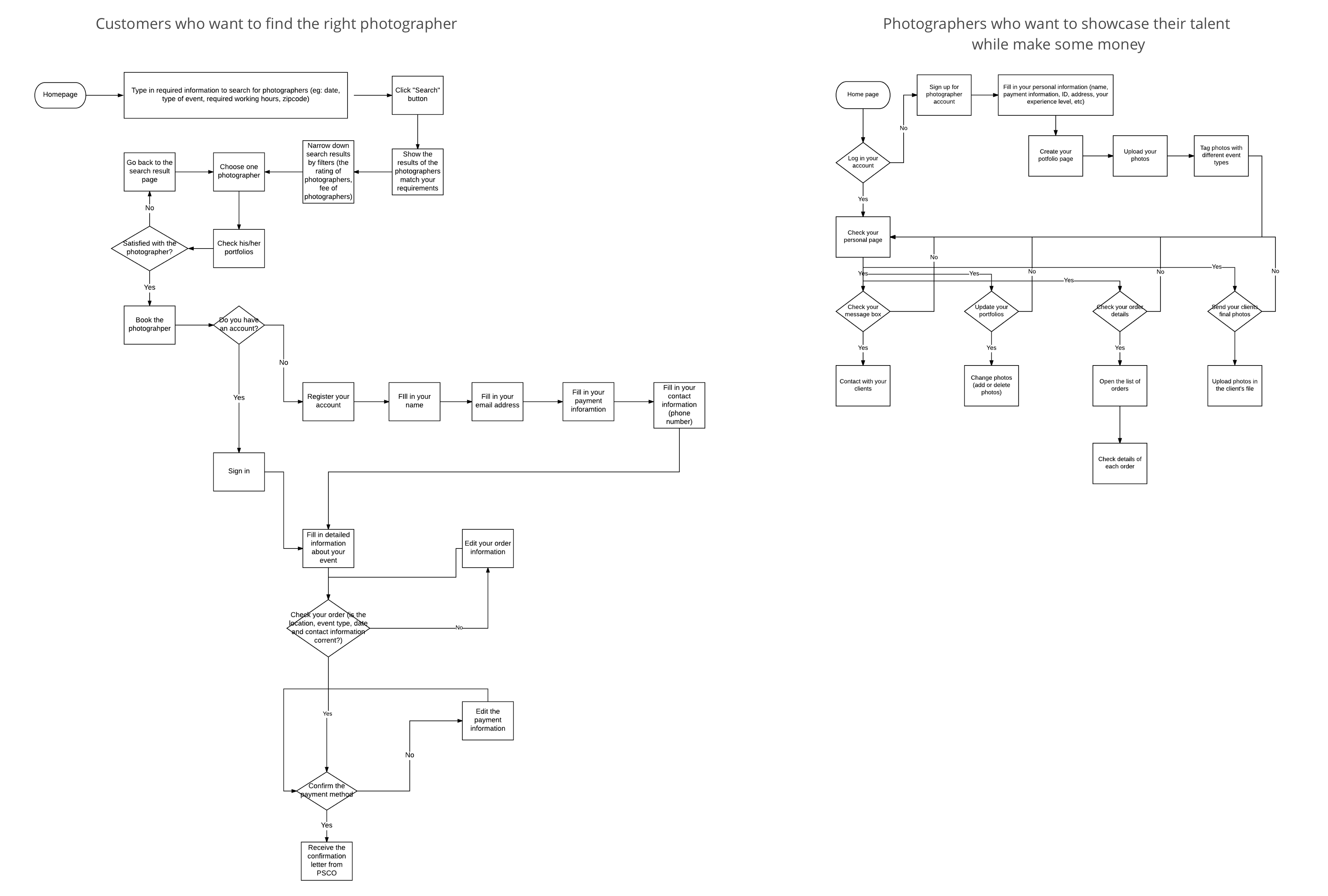
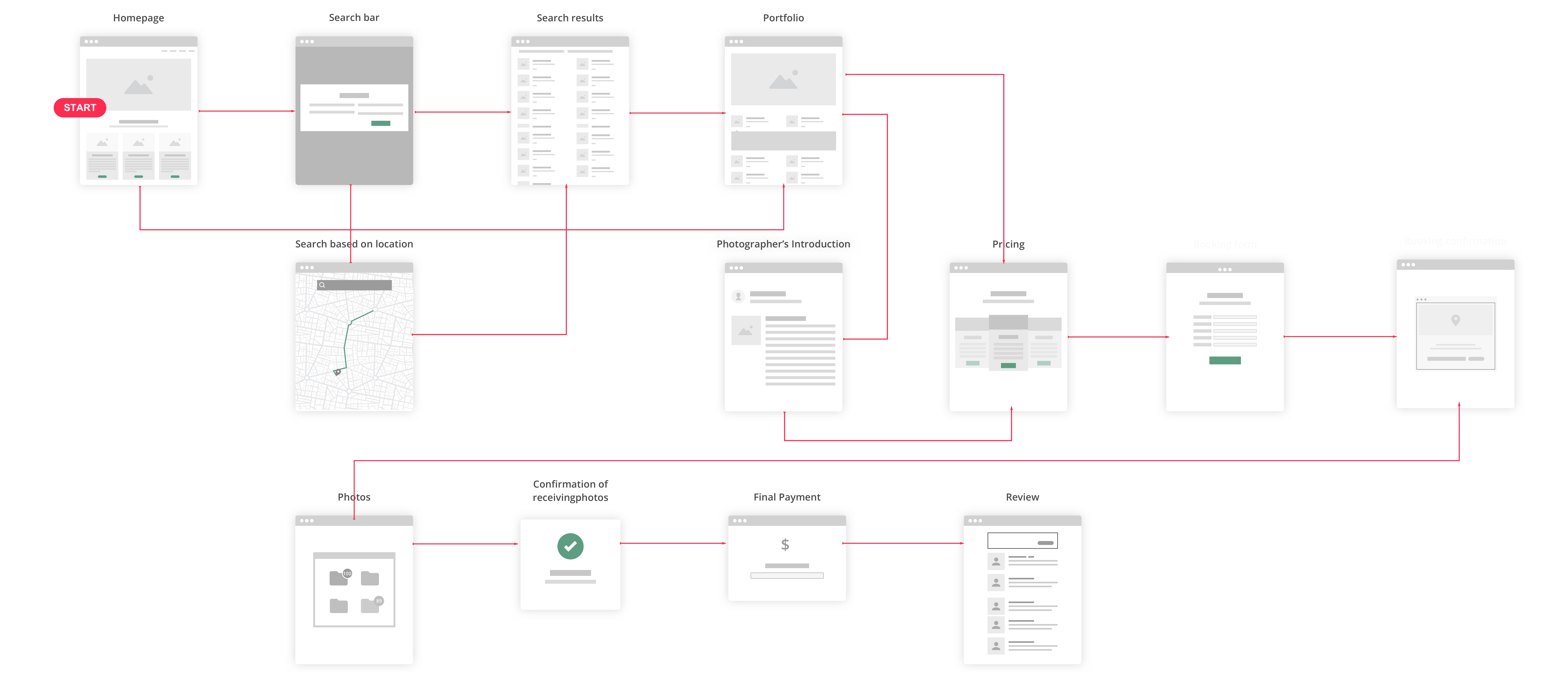
I created the user flows to better help me understand the users and how they will use PSCO.


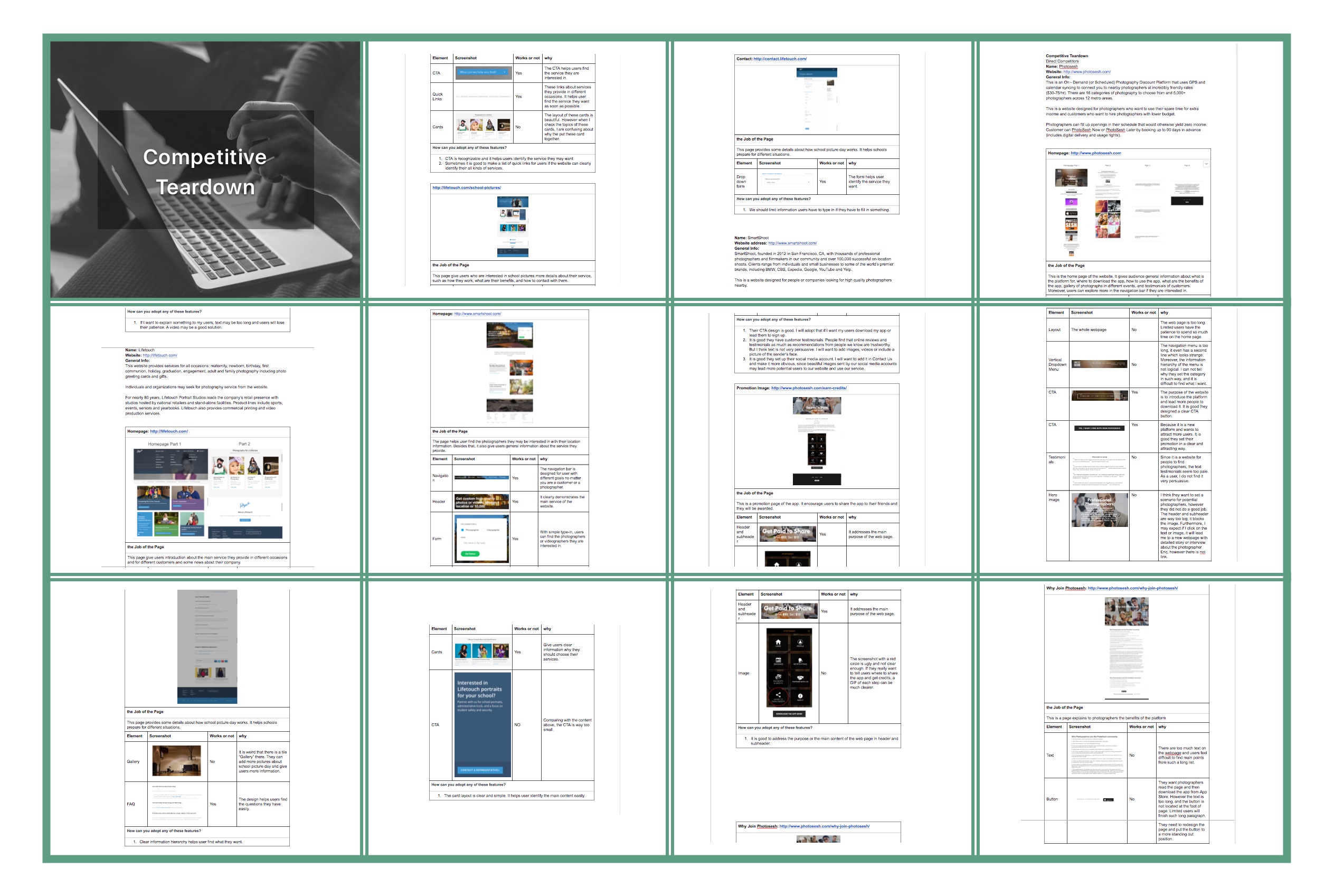
Competitive Teardown

I chose 4 sites that are direct competitors of PSCO and formatted this teardown. I analyzed each element of each specific page. Based on this teardown, I observed these similarities appear across such a wide range of sites.


Conclusion

●  What are the common elements?
Most of the websites provides navigation, hero image, headers, testimonials, FAQ, cards, and footer.

If the websites provide search results, search filters is necessary.

●  What are the priorities of those elements?
Navigation menu is always at the top of the webpage which gives users general information structure of the website.

Below that is hero image. A beautiful image or video always attracts people’s attention.

For e-commerce website, testimonials are really important. How to design that and what kind of information will we provide is really important.

FAQ is also necessary, we need to find a high-efficient  way for users to find their answers.

●  What are the 3-4 major themes that you might consider emulating?
I will emulate how Airbnb provides their FAQ with both search bar and tab navigation.

Besides that, their testimonials with senders’ image is worthy trying.

It is great how Smartshoot demonstrates their photographers’ projects. However I want to add a search filter in the page, because sometimes a photographer may have too much photos.

The last thing I will emulate is search filter. What I need to do is to identify different requirements of my users and help them narrow search results.


Content Chunking

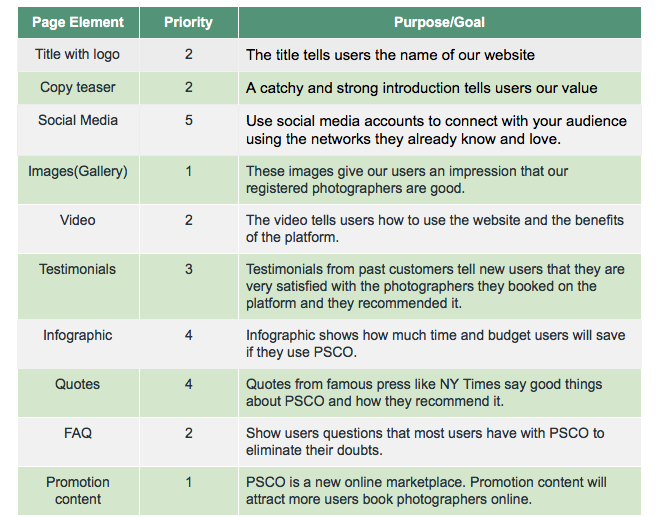
From what I learnt from this teardown, I listed out all the required elements and prioritized them.


Information Architecture

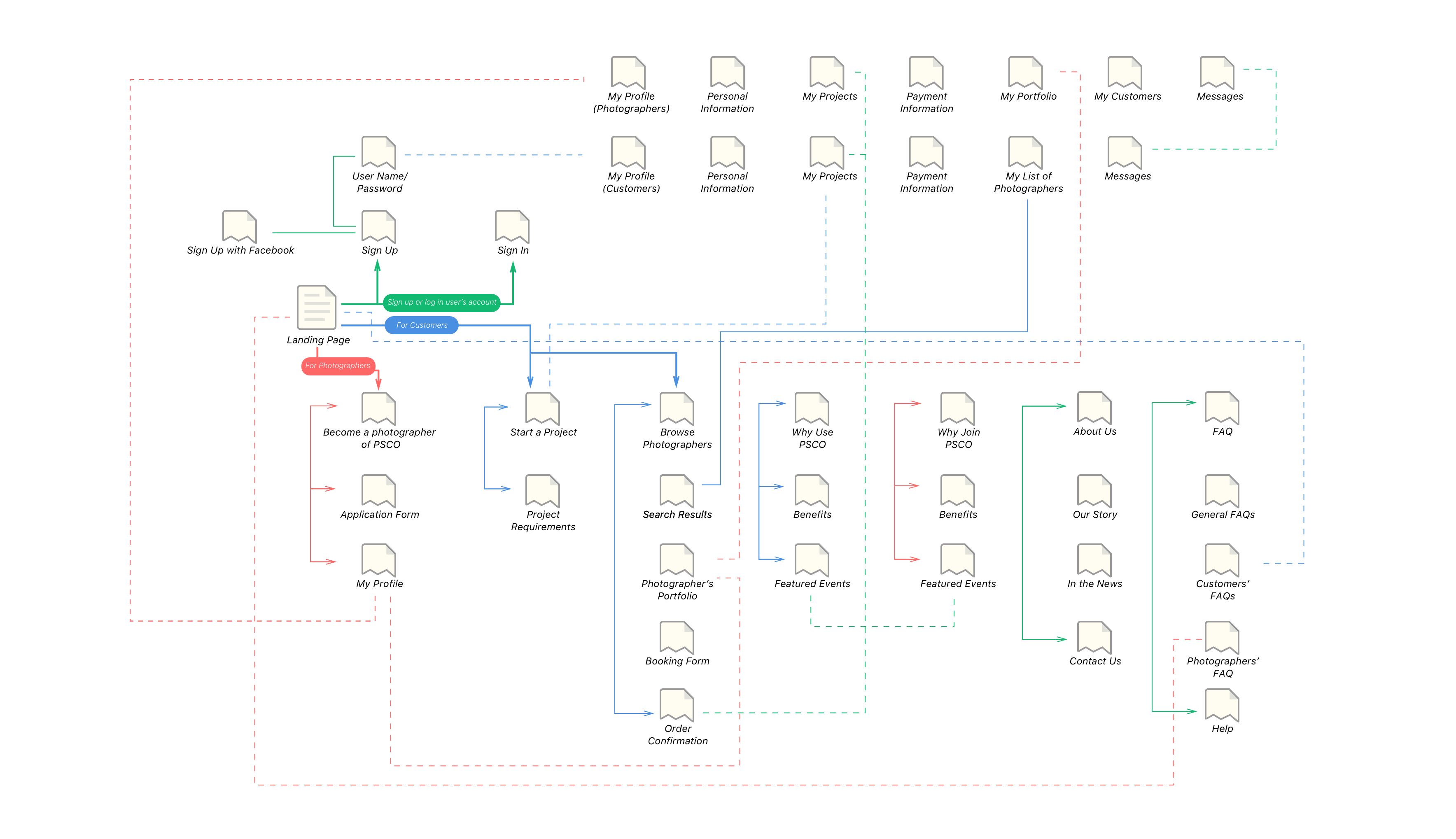
From what I learnt in former research and studies, I narrowed the features and information necessary for PSCO to function. I then created a site map to organize the pages, information, and navigation of PSCO and listed out all the required elements and prioritized them.


Paper Prototyping

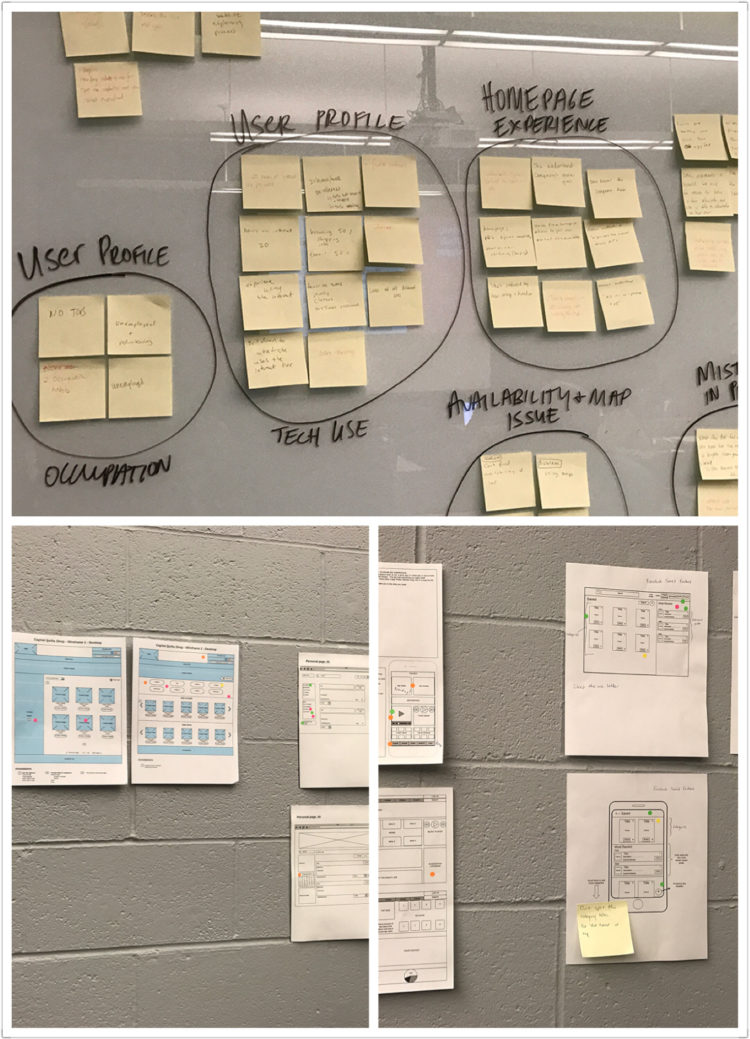
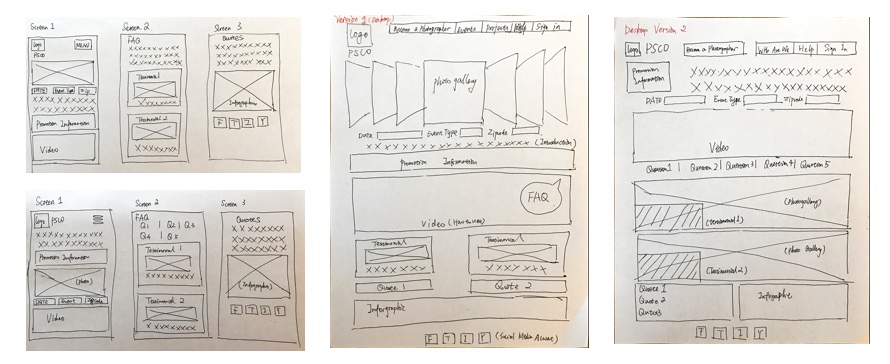
I created multiple sketches (home page, search result page,  profile page) for how to solve the problem. These sketches demonstrated the user interface and features of PSCO. The goal is to create different visualizations that maintain the content prioritization.


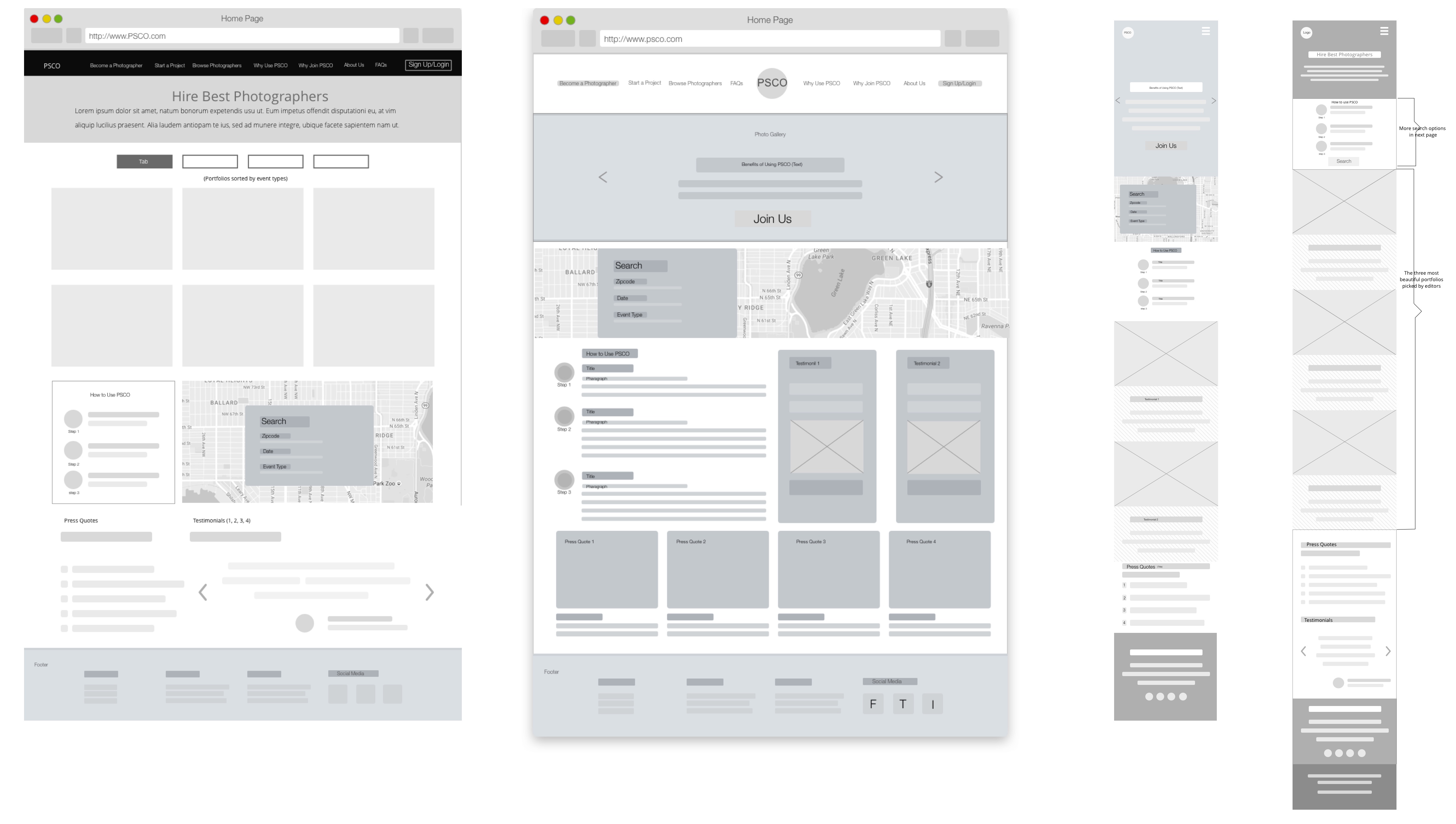
Wireframe

I created a progression of key webpages with annnotations. 


Interaction Map

Based on wireframes and user flows, I created the intercation map that shows the information architecture and features of the platform. 


User Testing

Goal 

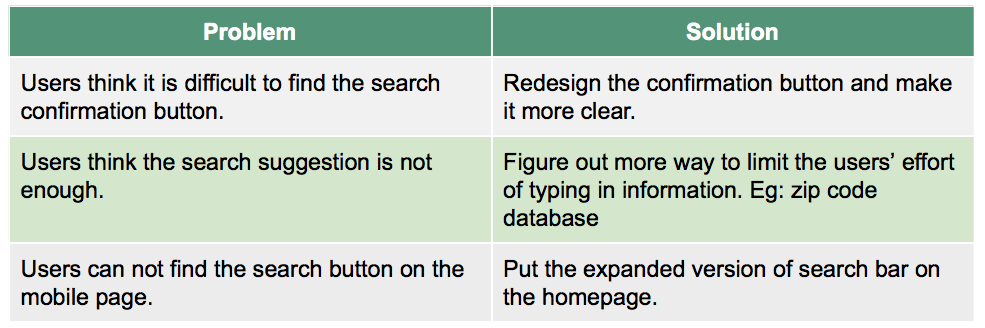
We want to know users’ impression of the website and  figure out if current design of search feature working or not, because we want our customers provide necessary information and find the photographers they like conveniently and quickly.

Methodology

A usability study was held in a meeting room with 3participants. Each participant session included a short briefing, an interview, a task performance with a laptop showing wireframes of key pages of PSCO website.

Research Questions

1. What information are users willing to share for search? (Do they feel they share too much private information?)

2. How many blanks do users want to fill for search? (or which kind of blank filling method they prefer?)

3. What kind of methods users prefer for providing information? (Eg: type in text, checkbox, click on calendar, etc.)

4. What are the most common errors users make when using search bar?

5. When users are using the search bar, do they find anything frustrating that they wish are easier or different?

6. Do we need to provide two versions of search bar for desktop webpages and mobile webpages?

7. What do they think about the website?

Tasks:

1. Check the homepage

2. Find the search bar

3. Look for some photographers via search bar with provided information by laptop

User Testing Highlights


Final Deliverables

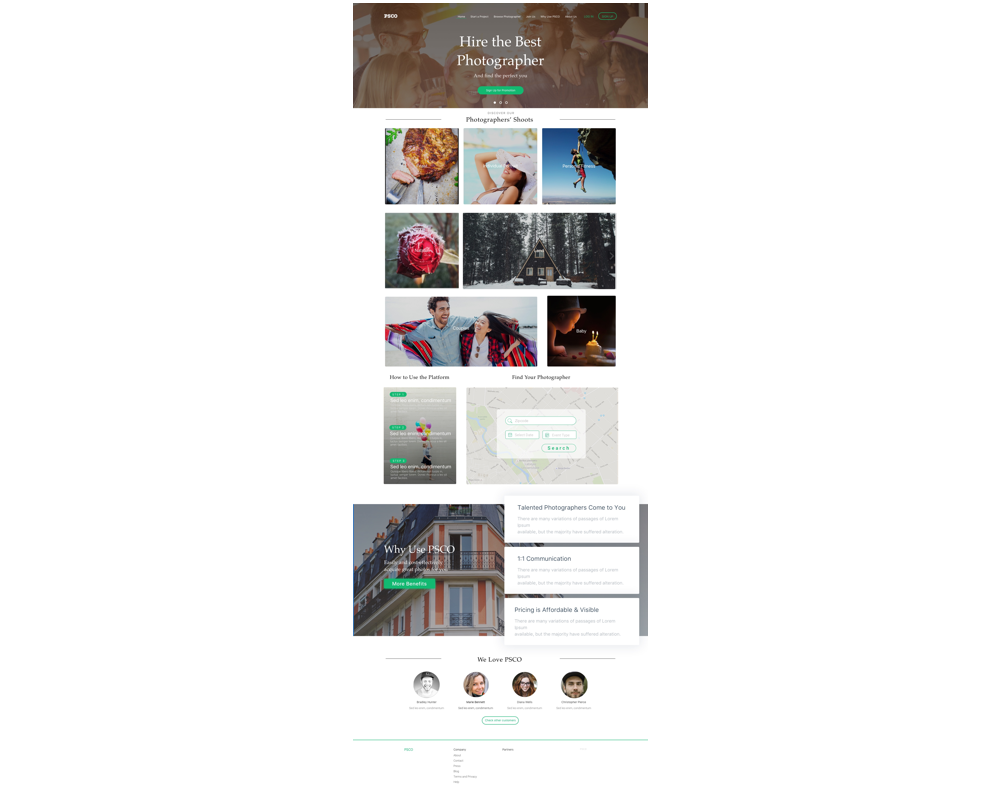
The way I address the communication problem between talented photographers and customers is through providing a platform for both parties. I want to build an ecommerce platform solve these problems. It is not just a photo sharing website. It is an ecommerce platform connecting photographers and customers. This is a managed environment for customers to find and enjoy better shooting services and for photographers to reach more new clients. 

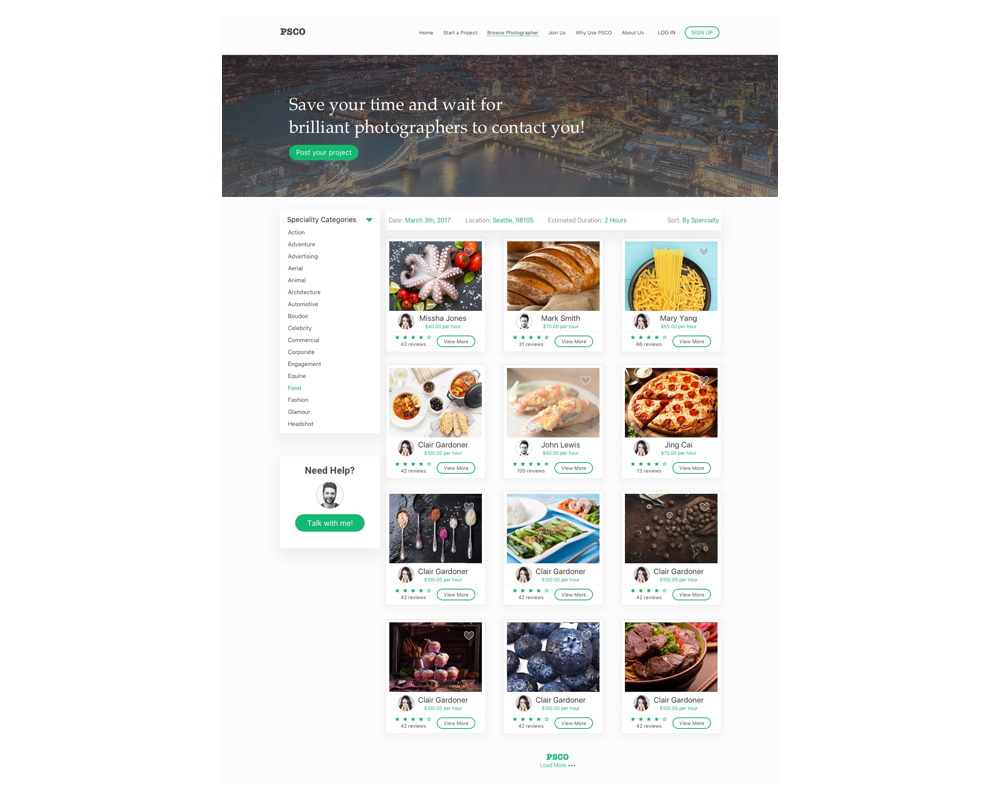
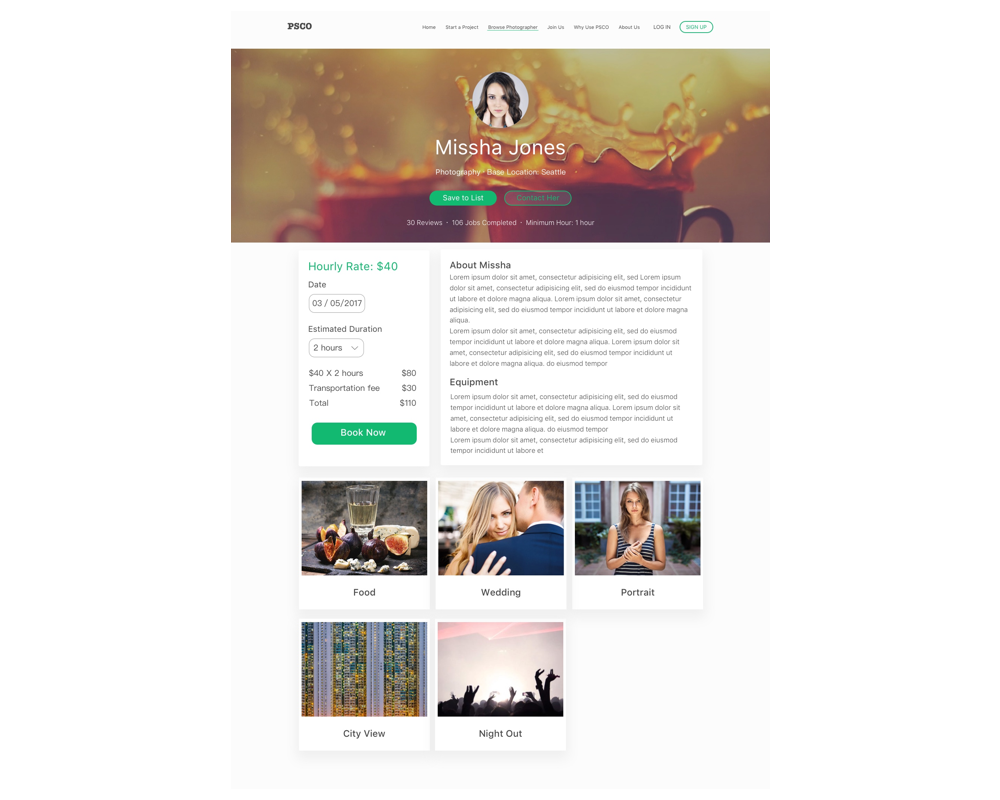
The following part is the final design of my solution. Because of the time limit, my design focused on the key screens of PSCO. I made some iterations based on feedbacks received from user testing the wireframes.


The Reflection

Learning: I learnt the foundations of both UX and content strategy, including user journeys and user research, content hierarchies, basic wireframing, principles of IA, and more, culminating in a creative strategy brief which encompasses both fields. I had the chance to  build the overlapping skills and concepts needed to succeed as a content strategist or a UX designer.

Design research: choosing the right research method (or a combination of several) is the key to getting useful information from users.

Prototyping: prototype doesn’t need to be pretty. Dirty mockups are enough for early user testing.